
All WordPress themes provide two options for adding content: you can choose to add content to a page or you can choose to add content to a post. Some themes offer a third option and is often titled Portfolio. Portfolio is a custom post type that the theme developers have created. If you’re using a theme with this option, check out the themes documentation to see what kind of cool stuff you can use it for! For now, let’s focus on pages and posts. They may look the same and they have nearly the same editing interface, so what’s the difference?
Pages vs Posts
The biggest difference between pages and posts are that posts are timestamped, whereas pages are timeless.
Pages are for static content. They do not have a publish date. Use pages when it does not make sense to list the content by date because you want your visitors to always be able to see that content in that spot, no matter when they visit your ePortfolio. Most themes support comments at the bottom of pages.
Posts are for timely content. They have a publish date, and they are displayed in reverse chronological order on your site’s blog page. Older posts can “fall off” the blog page (the content is still kept, but no longer visible). Posts are what you should think of when you hear the term “blog post.” All themes have a link to comments, and this is where readers can click to write a comment in response to your post. This may be a handy way to receive feedback from your peers! Also, you can categorize your posts, which is useful to help readers locate posts on your blog.
Categories and Tags
Now that you understand the differences between pages and posts, you my be wondering what categories and tags are. Categories and tags are two ways to group your content. Categories are meant for broad grouping, similar to a table of contents. All WordPress posts must be filed under a category. Tags are meant to be granular and descriptive. They can be used to describe specific details of your posts. They are not required for every post. For more detailed information about categories and tags, check out the Beginner’s Guide for WordPress page outlining categories vs tags at: https://www.wpbeginner.com/beginners-guide/categories-vs-tags-seo-best-practices-which-one-is-better/
Different Types of Posts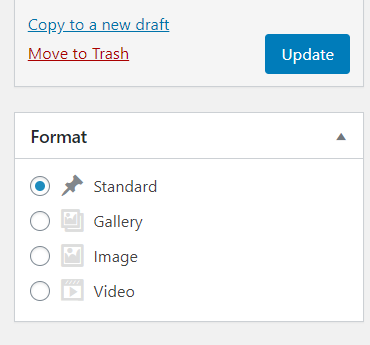
Different themes may give you options for how the post is displayed on the blog page. When you are in the back end editor for your post, you can select the format on the right hand side.
Here are some common formats:
Standard: This option is generally for text content. If you add a featured image, then the image will be added to the top of the post and be featured on the homepage.
Gallery: This option is great if you have a couple images to share. It will generate a slide show of your images at the top of the post and on the homepage. All you need to do is add the images to the post and make sure the gallery option is selected.
Image: This option is very similar to a Standard post with featured image, except that none of the text from the post will display on the homepage.
Video: This option is very similar to a Standard post. Only the text will display on the homepage unless you add a featured image. To add a video, you will first need to add it to the media gallery by upload or by URL.